Overview
This project is still under active development and may contain bugs. Contributions via Issues and PRs are welcome.
AgentGuard is a runtime access control system designed for AI agent tool calls. It sits between the agent and its actual tools, inspecting each operation against predefined policies before the tool executes, and returning an appropriate decision.
AgentGuard is most valuable when agents can:
- send emails
- access external networks
- execute shell commands
- read and write files
- access databases
These capabilities carry higher security risk. AgentGuard's role is to add a configurable control layer before these operations actually happen.
Project scope
AgentGuard doesn't focus on how to build agents — it focuses on governing how agents use their tools. It's designed to answer questions like:
- Which tools may be called, and which must be blocked
- Which destinations, email addresses, or paths are permitted
- Which data should not be sent externally
- Which operations require human approval
- Which high-risk actions an agent has actually performed
AgentGuard is best used as a security control layer within an agent system, not as a business orchestration layer.
Key capabilities
The most important features in the current release:
- Allow or deny tool calls
- Require human approval for uncertain but high-risk operations
- Audit critical operations
- Make rule decisions based on task context and call history
Typical configurations include:
- Blocking low-trust agents from running dangerous commands
- Preventing sensitive data from being sent to external emails or websites
When to use AgentGuard
If an agent is purely conversational and never calls external tools, there's usually no need for AgentGuard.
If the agent can reach real system resources, you should consider integrating it — especially in these scenarios:
- Office automation assistants
- Automation agents with system-level capabilities
- Multi-team shared agent platforms
- Projects that need security policies separated from business code
How it works
From a user's perspective, the workflow is:
- Define the agent and its available tools
- Integrate AgentGuard into the agent's runtime
- Write access control policies
- When the agent makes a tool call, AgentGuard inspects it first
- AgentGuard decides how to handle the call based on policy
In other words, AgentGuard doesn't replace the agent's task logic — it provides a unified decision and constraint layer before the agent executes high-risk operations.
Architecture
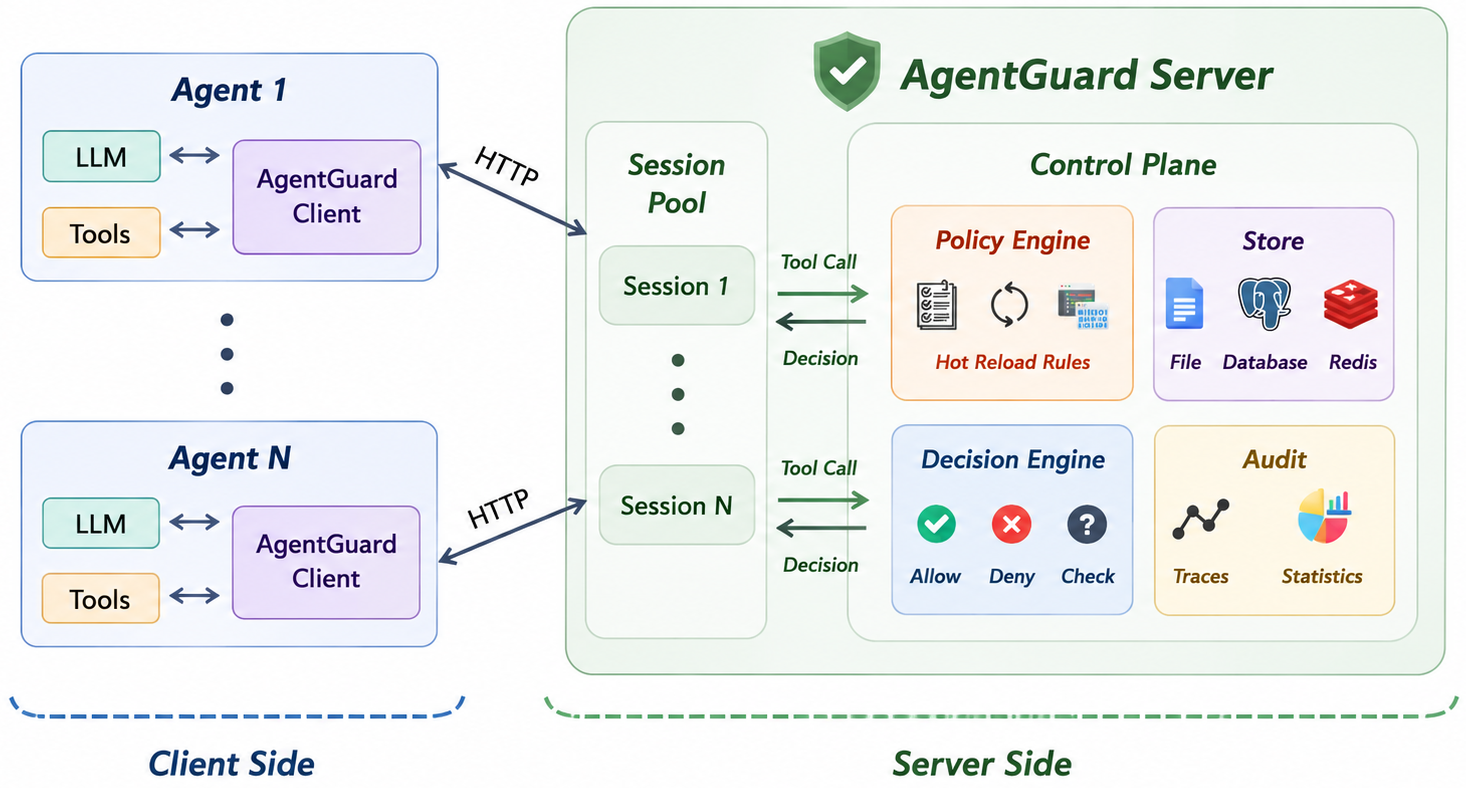
What to focus on
For most users, the most important thing is not the internal implementation, but the following aspects.
Tool boundaries
First, identify which tool capabilities the agent actually has, especially these high-risk categories:
- Outbound tools (email, HTTP)
- System command tools
- File write tools
- Database write tools
- Sensitive data read tools
These are the first things you should write policies for.
Deny rules
Identify operations that must never happen, for example:
- Sending internal data to external destinations
- Running dangerous shell commands
- Modifying critical system files or production databases
These are best configured as direct denials.
Approval rules
For operations that can't be easily classified as "safe" or "dangerous," add a human approval mechanism as a supplementary control.
What the current version handles best
AgentGuard is currently best suited for tool-call governance scenarios, including:
- Email outbound control
- HTTP outbound control
- Shell, filesystem, and database access control
- Rule decisions based on task context and call history
- Audit and human approval
If your goal is to establish clear, configurable, auditable constraints on how agents use their tools, the current version provides solid support.